


Unfollower Check: Check Who’s Not Following You
Back on Instagram
The safest way to run an Instagram unfollow check without giving anyone your password. Upload Instagram’s official data export and see who does not follow you back. No login. 100% free. Analysis stays on your device.
Unfollower Checker
100% Private • No Login Required • Data Never Leaves Your Device
Upload Your Instagram Data ZIP
Instagram → Profile → Menu → Settings and activity → Accounts Centre → Your information and permissions → Export your information → Create Export → Export to Device → Format: JSON → Date range: All time → Start Export
0
0
0
0
How the Instagram Unfollow Checker Works
We compare the followers list in your export with the accounts you follow. In a few seconds you get a clear follower and unfollower check: who is not following you back, who is mutual, and who follows you that you do not follow.

Request Your Data from Instagram
Download your Followers and Following list in JSON format

Download the ZIP File
Instagram will email you the ZIP file, or you can direct download from Instagram

Upload & Analyze
Upload the file and see who doesn’t follow you back
Why Use This Instagram Unfollow Checker Instead of Checking by Hand?
Manual scrolling misses people and wastes time. This Instagram unfollow checker uses Instagram’s own export, so the list matches your account at the moment you downloaded the file.

Save Hours Every Week
Stop wasting time manually scrolling through your followers. Unfollowers Tracker does the work for you in seconds, so you can focus on creating content instead of checking lists.

Never Miss an Unfollow
Manual checking is incomplete and easy to mess up. Our tool gives you precise, up-to-date data so you catch every unfollow, even the ones you’d normally miss.
Get Real Insights, Not Just Names
Manual checking only shows you a list. Unfollowers Tracker helps you understand patterns, identify inactive followers, and make smarter decisions about who to follow back.
Blogs
Clear guides to help you analyze followers, find who doesn’t follow back, and stay private.
“Soft Blocking” on Instagram: The Polite Way to Force an Unfollow
How to Audit a Client’s Instagram Followers (Without Asking for Passwords)
How Your Follower-to-Following Ratio Ruins Your Instagram Reach
What Are Instagram Mutuals and Fans? Understanding Your Audience Data
How to Track Instagram Follower Growth and Retention
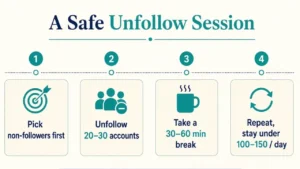
Instagram Rate Limits: How Many People Can You Safely Unfollow in a Day?
Frequently Asked Questions
How can I check who unfollowed me on Instagram safely?
The safest method is using Unfollower Check. Request your official Instagram data export (JSON format), upload the ZIP file to UnfollowerCheck.com, and instantly see who doesn’t follow you back. No login or password is required, and all analysis happens on your device.
Is Unfollower Check safe?
Yes, Unfollower Check is 100% safe. It never asks for your Instagram username or password and does not access your account. It only analyzes the official data export you download from Instagram yourself, so there is zero risk of bans or restrictions associated with third-party logins or bots.
How does Unfollower Check work without login?
You download your Followers and Following lists from Instagram’s Accounts Center in JSON format. Upload the ZIP to Unfollower Check. The tool matches the two lists in your browser and shows Not Following Back, Mutuals, Fans, and totals. Your data never leaves your device.
How do I download my Instagram followers and following data for Unfollower Check?
Go to Instagram → Profile → Menu → Settings and activity → Accounts Centre → Your information and permissions → Export your information → Create Export → Export to Device → Format: JSON → Date range: All time → Start Export. Download the ZIP when ready and upload it to UnfollowerCheck.com.
Is my data private when I use Unfollower Check?
Completely. Unfollower Check processes everything locally in your browser. Files are not uploaded to any server, stored, or shared. This is one of the main reasons users choose Unfollower Check over traditional unfollower apps.
What is the difference between “Not Following Back,” Mutuals, and Fans on Unfollower Check?
Not Following Back = people you follow who do not follow you. Mutuals = accounts that follow each other. Fans = people who follow you but you do not follow back. Unfollower Check clearly categorizes all three so you can clean your list intelligently.
Can I use Unfollower Check on mobile (iPhone or Android)?
Yes. Unfollower Check works in any modern mobile browser. Request the Instagram data export on your phone, download the ZIP, and upload it directly on the UnfollowerCheck.com site.
How accurate is the Unfollower Check tool?
It is highly accurate because it uses Instagram’s own official export data. Results reflect the exact state of your followers and following at the time of the export. For the most current picture, request a fresh export.
How long does it take to get the Instagram data export?
It usually takes a few minutes to a few hours depending on account size and Instagram’s servers. Once you receive the email or in-app notification, download the ZIP and analyze it immediately with Unfollower Check.
Is Unfollower Check free?
Yes. Unfollower Check is free to use with no hidden fees for the core unfollower analysis and CSV download of results.
Can Unfollower Check handle large Instagram accounts?
Yes. The tool is designed to process the official export files efficiently, including accounts with tens or hundreds of thousands of connections (performance depends on your device).
Why should I choose Unfollower Check over other Instagram unfollower apps?
Most apps require login credentials or use risky methods that can flag your account. Unfollower Check is privacy-first, uses only official Instagram data, keeps everything on your device, and delivers clear categorized results plus CSV export — all without compromising security.
Can I download the list of people who don’t follow me back?
Yes. After analysis, Unfollower Check lets you download the current list as a CSV file for easy review or further action.
Do I need to upload the full Instagram ZIP or just certain files?
Upload the ZIP (or the relevant followers/following JSON files inside it). Unfollower Check extracts and compares the necessary lists automatically.
How to see who unfollowed me on Instagram without app / without login?
Use Instagram’s official data export and upload it to Unfollower Check. Go to Settings → Accounts Centre → Export your information → choose JSON format and “Followers and following” → All time. Download the ZIP when ready and upload it at UnfollowerCheck.com. You’ll instantly see who doesn’t follow you back — no app, no login, and no password required.
How to find ghost followers / inactive accounts?
Start with Unfollower Check using your Instagram data export to identify people who don’t follow you back. Then manually review your followers for red flags such as no profile picture, zero posts, or suspicious usernames. Instagram also sometimes shows deactivated accounts in your followers list, which you can remove directly.
What is an Instagram unfollow checker, and how is this one different?
An Instagram unfollow checker compares who you follow with who follows you. Most apps ask for your login. Unfollower Check does not. You download your official Instagram export, upload the ZIP here, and the unfollower checker runs in your browser. You see who is not following you back without sharing a password.