Bhai, let’s be honest. Almost every one of us has felt that slight pang when our Instagram follower count drops. You keep thinking – “Kaun gaya? Kyun gaya?” Manually scrolling through hundreds or thousands of followers is pure torture, and most apps that claim to show unfollowers ask for your Instagram password. That’s a big no in today’s time.
Thankfully, there’s a much safer and smarter way. Unfollower Check is a free tool that works completely without login or password. You just upload the official data file that Instagram itself gives you, and the tool shows you everything – who doesn’t follow you back, who your mutuals are, and who are pure fans.
This guide is written in simple language so that anyone – college student, working professional, content creator, or business owner from any part of India – can follow it easily.
What Exactly is Unfollower Check?
Unfollower Check is a 100% private Instagram unfollower finder.
- No Instagram login
- No password sharing
- Your data never leaves your phone or laptop (everything happens inside your browser)
- Completely free
It compares your followers list with your following list and clearly shows three things:
- Not Following Back – People you follow who don’t follow you
- Mutuals – People who follow each other
- Fans – People who follow you but you don’t follow them
You can even download the full list as a CSV file.
How Does This Tool Actually Work?
Instagram allows every user to download a complete copy of their own data. This official ZIP file contains your full followers and following lists in JSON format.
When you upload that ZIP on Unfollower Check, the tool reads the lists locally on your device. It never sends the file to any server. That’s why it is one of the safest methods available in 2026.
Step-by-Step Guide: How to Use Unfollower Check
Follow these simple steps carefully.
Step 1: Open Instagram and Go to Your Profile
Open the Instagram app on your phone. Go to your profile and tap the three horizontal lines (menu) in the top right corner.
Step 2: Reach the Export Option
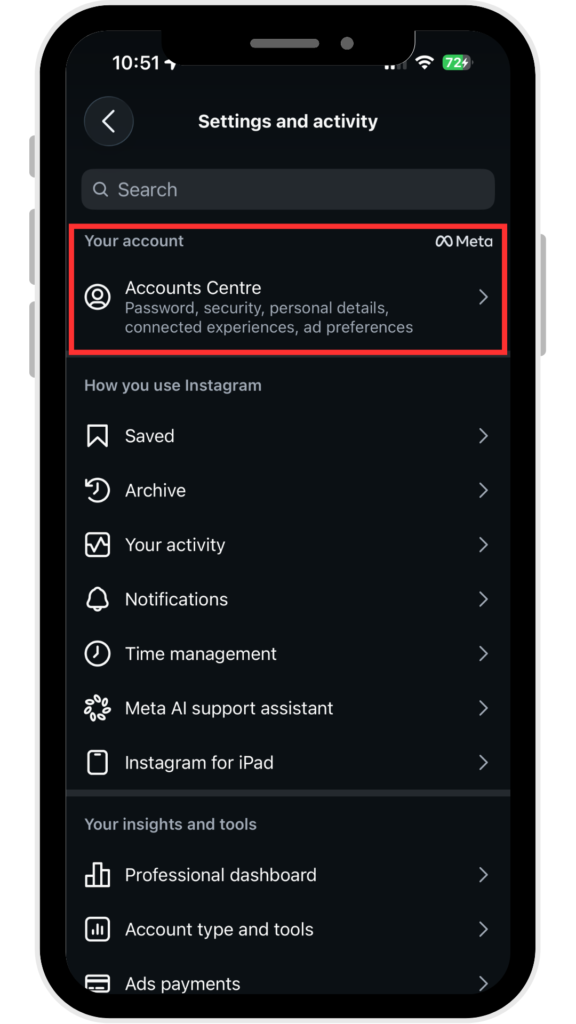
- Tap Settings and activity (or Settings and privacy)
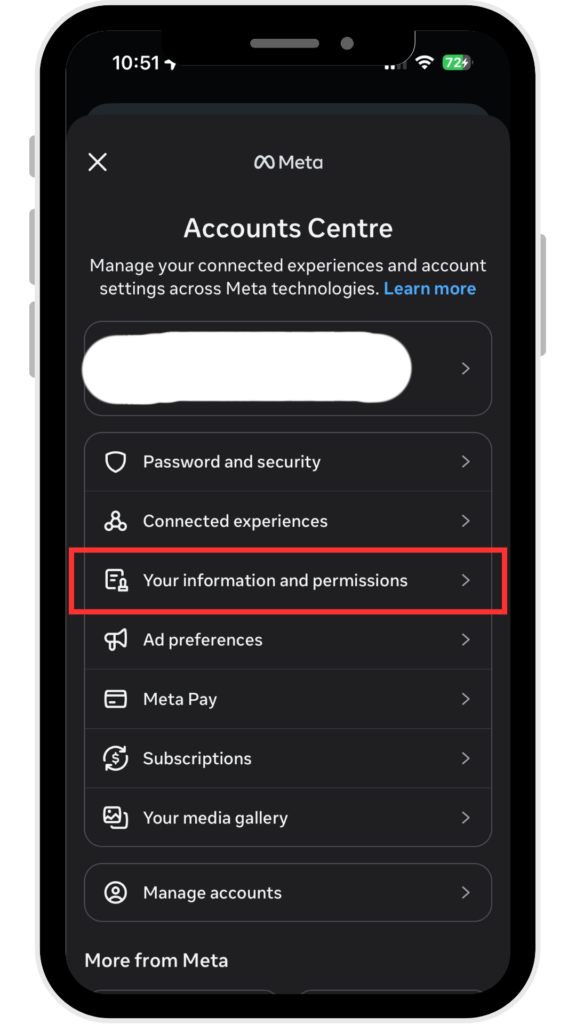
- Then open Accounts Centre
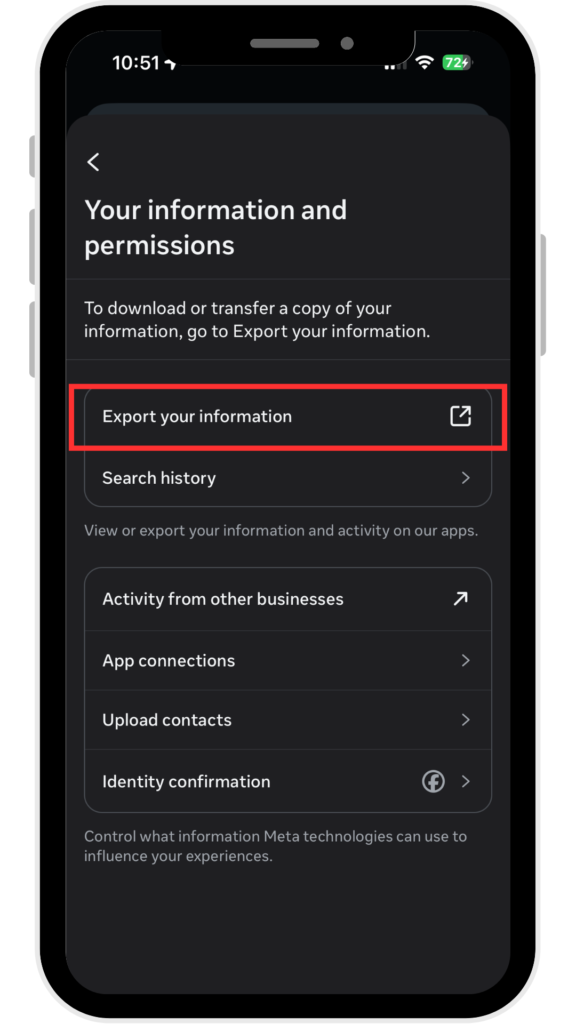
- Go to Your information and permissions
- Select Export your information (or Download your information)
Step 3: Create the Correct Export File
This is the most important step. Make these exact selections:
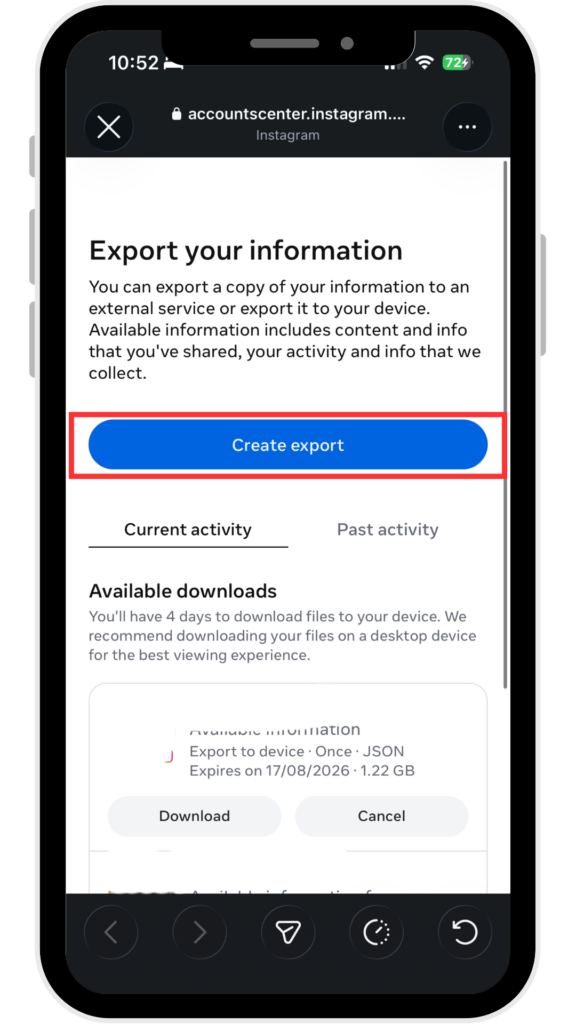
- Choose Export to device
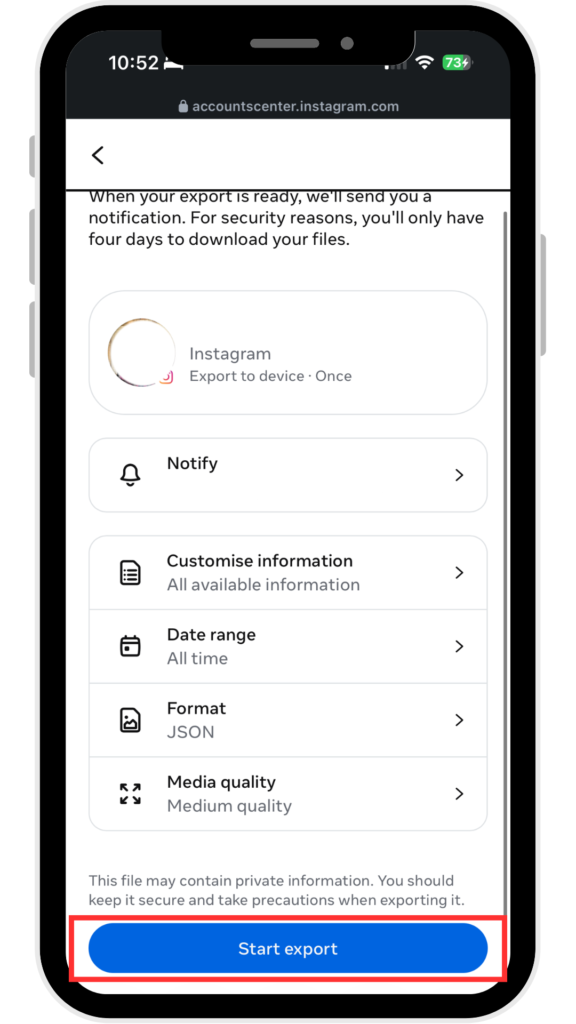
- Select only the required data (Followers and following is enough)
- Format → JSON (very important – don’t choose HTML)
- Date range → All time
- Then tap Start Export
Instagram will prepare the file. It usually takes anywhere from a few minutes to a couple of hours depending on your account size. You will get a notification or email when it is ready.
Step 4: Download the ZIP File
Once ready, download the ZIP file on your phone or laptop. Do not unzip it. Keep the original ZIP file as it is.
Step 5: Upload on Unfollower Check
- Open https://unfollowercheck.com/ in Chrome or any modern browser (works perfectly on mobile too).
- Click Choose File and select the ZIP you just downloaded.
- Hit the green Analyze Now button.
Step 6: See Your Results
Within seconds you will see clear numbers:
- Not Following Back
- Mutuals
- Fans
- Total Followers & Following
You can download any list as CSV and review it calmly.
Why Indian Users Prefer This Method
In India we are rightly careful about account security. Password-based unfollower apps have caused many people account restrictions or even permanent bans. With Unfollower Check there is zero risk because Instagram itself provides the data and the tool never touches your account.
It works equally well whether you have 500 followers or 50,000+.
Important Tips
- Always choose JSON format and All time date range.
- Prefer doing this on Wi-Fi because the ZIP file can be a few MBs.
- You can repeat the process every few weeks for updated results.
- The tool works on both Android and iPhone browsers.
Final Words
Checking who unfollowed you should never put your Instagram account at risk. Unfollower Check gives you a clean, private and free way to do exactly that. Just request your official data from Instagram, upload the ZIP, and get clear insights in minutes. No drama, no risk, no password sharing.
Go try it once – you’ll never go back to risky apps again. If you face any issue while exporting the data, just comment below. Happy to help fellow Instagram users!
Stay safe online.
Frequently Asked Questions
Is it really safe to use Unfollower Check?
Yes, completely safe. The tool never asks for your Instagram username or password. You only upload the official data file that Instagram itself provides you. All analysis happens inside your browser and your data never leaves your device.
How long does it take to get the Instagram data export?
Usually it takes anywhere from a few minutes to 1–2 hours, depending on the size of your account. For most people it is ready within 15–30 minutes. Instagram will notify you once the ZIP file is ready for download.
Can I do this on my mobile phone?
Yes. You can request the data export and upload the ZIP file directly from your Android or iPhone browser. The entire process works smoothly on mobile.
Why do I need to choose JSON format and “All time”?
JSON is the format that tools can read properly. If you choose HTML, the tool won’t be able to analyse the file. Selecting “All time” ensures you get the complete list of followers and following, otherwise the results will be incomplete.
Will Instagram know that I used this tool?
No. Since you are only downloading your own data from Instagram and analysing it locally on your device, Instagram has no way of knowing that you used Unfollower Check.